Description
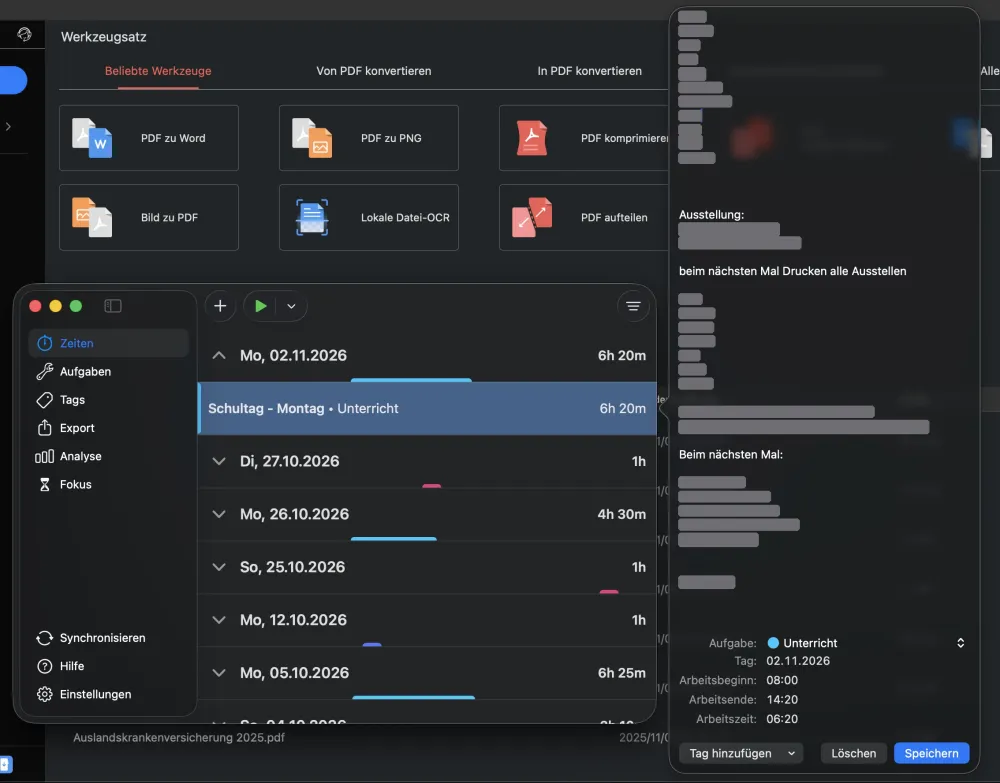
When an entry has a long note, the edit popover grows with the text instead of
becoming scrollable. Once the note is taller than the available screen space,
the popover is cut off at the top of the screen. Only the last lines of the note
are visible. There is no scrollbar, and scrolling with trackpad or mouse inside
the note field does nothing.
Steps to reproduce
- Create a time entry.
- Add a long note (e.g. 40+ lines, one short line each).
- Select the entry in the list so the edit popover opens.
- Look at the note field.
Expected behavior
The popover keeps a maximum height that fits on screen, and the note field
becomes scrollable (with a visible scrollbar) so the whole note can be read
and edited.
Actual behavior
The popover extends beyond the top of the screen. The beginning of the note is
not visible and cannot be reached.
What I tried (none of it helped)
- Scrolling with trackpad and mouse wheel inside the note field
- Cmd + Up Arrow inside the note field to jump to the beginning
- Setting "Show scroll bars" to "Always" in macOS System Settings
- Moving the main window lower on the screen / using full screen
Current workaround
Select all text in the note (Cmd + A), copy it into a text editor, edit it
there and paste it back.
Environment
- WorkingHours version: 2.19.3
- macOS version: 26.6.2 (25G83)
- Device: Apple M4 Pro
Thanks for your help! Love your app. <3
